
概念
线程是操作系统中独立的个体,但这些个体如果不经过特殊的处理就不能成为一个整体,线程间的通信就成为整体的必用方式之一。当线程存在通信指挥,系统间的交互性会更强大,在提高CPU利用率的同时还会使开发人员对线程任务在处理的过程中进行有效地把控与监督。
使用wait/notify方法实现线程间的通信,注意:
1、wait和notify必须配合synchronized关键字使用
2、wait方法释放锁,notify方法不释放锁
示例:
当前两个线程t1,t2,当t1添加5个元素的时候,t2线程停止
例1:
public class Demo1 {
	@SuppressWarnings("rawtypes")
	private volatile static List list = new ArrayList();

	@SuppressWarnings("unchecked")
	public void add() {
		list.add("aaa");
	}

	public int size() {
		return list.size();
	}

	public static void main(String[] args) {
		final Demo1 demo1 = new Demo1();
		Thread t1 = new Thread(new Runnable() {
			@Override
			public void run() {
				try {
					for (int i = 0; i < 10; i++) {
						demo1.add();
						System.out.println("当前线程 : " + Thread.currentThread().getName() + "添加了一个元素");
						Thread.sleep(500);
					}
				} catch (Exception e) {
					e.printStackTrace();
				}
			}
		}, "t1");

		Thread t2 = new Thread(new Runnable() {
			@Override
			public void run() {
				while(true) {
					if (demo1.size() == 5) {
						System.out.println("当前线程收到通知 : " + Thread.currentThread().getName() + ", size = 5 线程停止...");
						throw new RuntimeException();
					}
				}
			}
		}, "t2");
		t1.start();
		t2.start();
	}
}
效果:
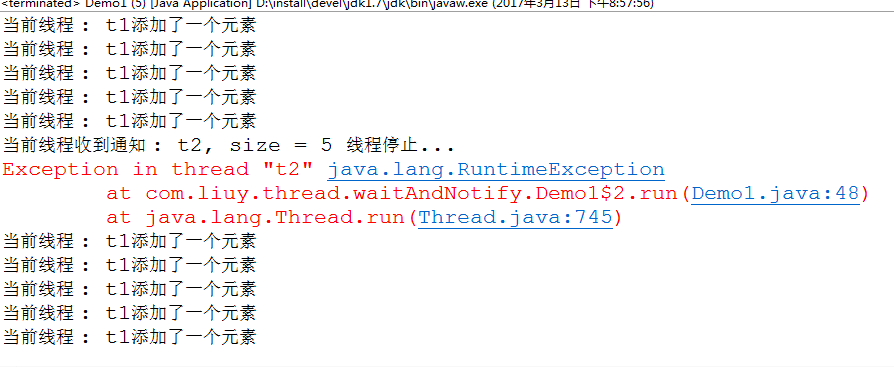
这里t2线程中用的while(true)实现的,改进,如:使用wait/notify
public class Demo2 {
	@SuppressWarnings("rawtypes")
	private volatile static List list = new ArrayList();

	@SuppressWarnings("unchecked")
	public void add() {
		list.add("aaa");
	}

	public int size() {
		return list.size();
	}

	public static void main(String[] args) {
		final Object lock = new Object();
		final Demo2 demo2 = new Demo2();
		Thread t1 = new Thread(new Runnable() {
			@Override
			public void run() {
				try {
					synchronized (lock) {
						for (int i = 0; i < 10; i++) {
							demo2.add();
							System.out.println("当前线程 : " + Thread.currentThread().getName() + "添加了一个元素");
							Thread.sleep(500);
							if (demo2.size() == 5) {
								System.out.println("发出通知...");
								lock.notify();
							}
						}
					}
				} catch (Exception e) {
					e.printStackTrace();
				}
			}
		}, "t1");

		Thread t2 = new Thread(new Runnable() {
			@Override
			public void run() {
				try {
					synchronized (lock) {
						if (demo2.size() != 5) {
							lock.wait();
						}
						System.out.println("当前线程收到通知 : " + Thread.currentThread().getName() + ", size = 5 线程停止...");
						throw new RuntimeException();
					}
				} catch (InterruptedException e) {
					e.printStackTrace();
				}
			}
		}, "t2");
		t2.start();
		t1.start();
	}
}
效果:
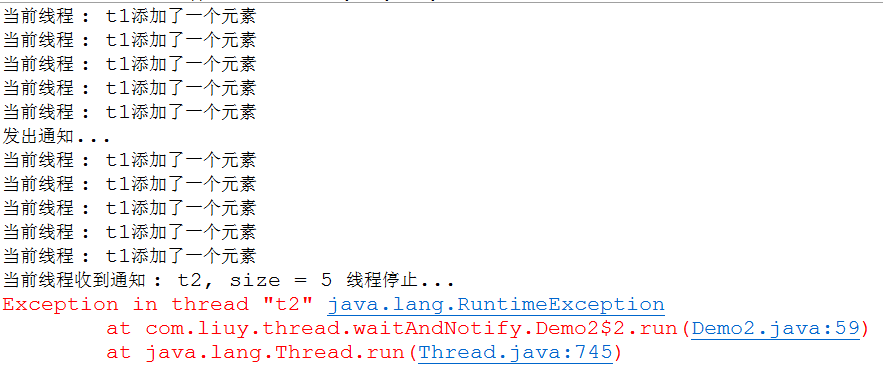
说明:在t1添加5条元素时,发出了通知,但是notify并没有释放锁,所以t2线程还不能执行。弊端就是不实时,使用CountDownLatch改进:await()/countDown()
public class Demo3 {
	@SuppressWarnings("rawtypes")
	private volatile static List list = new ArrayList();

	@SuppressWarnings("unchecked")
	public void add() {
		list.add("aaa");
	}

	public int size() {
		return list.size();
	}

	public static void main(String[] args) {
		final CountDownLatch cdl = new CountDownLatch(1);
		final Demo3 demo2 = new Demo3();
		Thread t1 = new Thread(new Runnable() {
			@Override
			public void run() {
				try {
					for (int i = 0; i < 10; i++) {
						demo2.add();
						System.out.println("当前线程 : " + Thread.currentThread().getName() + "添加了一个元素");
						Thread.sleep(500);
						if (demo2.size() == 5) {
							System.out.println("发出通知...");
							cdl.countDown();
						}
					}
				} catch (Exception e) {
					e.printStackTrace();
				}
			}
		}, "t1");

		Thread t2 = new Thread(new Runnable() {
			@Override
			public void run() {
				try {
					if (demo2.size() != 5) {
						cdl.await();
					}
					System.out.println("当前线程收到通知 : " + Thread.currentThread().getName() + ", size = 5 线程停止...");
					throw new RuntimeException();
				} catch (InterruptedException e) {
					e.printStackTrace();
				}
			}
		}, "t2");
		t2.start();
		t1.start();
	}
}
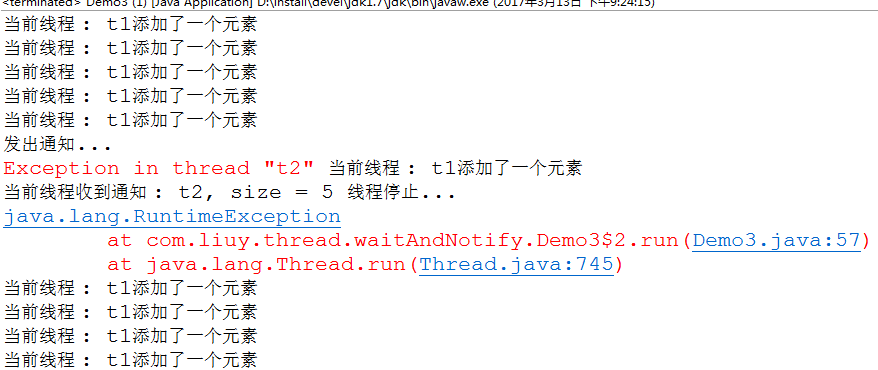
效果:
使用wait和notify模拟queue
需求:
模拟BlockingQueue:首先它是一个队列,并且支持阻塞的机制,阻塞的放入和得到数据,实现简单的方法put与take
put(obj):
把obj加到BlockingQueue里,如果BlockingQueue没有空间了,则调用此方法的线程被阻塞着,直到BlockingQueue里面有空间再继续。
take():
取走BlockingQueue里排在首位的数据,如BlockingQueue为空,则调用此方法的线程被阻塞着,直到BlockingQueue里面有数据再继续。
public class Demo4 {
	// 盛装元素的集合
	private LinkedList<Object> list = new LinkedList<Object>();
	// 最小长度
	private int minSize = 0;

	// 长度
	AtomicInteger length = new AtomicInteger(0);

	// 最大长度
	private final int maxSize;

	private final static Object lock = new Object();

	public Demo4(int maxSize) {
		this.maxSize = maxSize;
	}

	// 添加元素
	public void put(Object obj) {
		synchronized (lock) {
			if (length.get() == this.maxSize) {
				try {
					lock.wait();
				} catch (InterruptedException e) {
					e.printStackTrace();
				}
			}
			list.add(obj);
			length.incrementAndGet();
			System.out.println("当前线程" + Thread.currentThread().getName() + "添加了一个元素 : " + obj);
			lock.notifyAll();
		}
	}

	// 取出元素
	public Object take() {
		Object obj = null;
		synchronized (lock) {
			if (length.get() == this.minSize) {
				try {
					lock.wait();
				} catch (InterruptedException e) {
					e.printStackTrace();
				}
			}
			obj = list.removeFirst();
			length.decrementAndGet();
			System.out.println("当前线程" + Thread.currentThread().getName() + "取出了一个元素 : " + obj);
			lock.notifyAll();
		}
		return obj;
	}

	public static void main(String[] args) {
		final Demo4 demo4 = new Demo4(5);
		demo4.put("aa");
		demo4.put("bb");
		demo4.put("cc");
		demo4.put("ee");

		new Thread(new Runnable() {
			@Override
			public void run() {
				demo4.put("ff");
				demo4.put("gg");
				demo4.put("hh");
				demo4.put("ii");
				demo4.put("jj");
			}
		}, "t1").start();

		new Thread(new Runnable() {
			@Override
			public void run() {
				demo4.take();
				demo4.take();
			}
		}, "t2").start();

		new Thread(new Runnable() {
			@Override
			public void run() {
				demo4.take();
				demo4.take();
			}
		}, "t3").start();
	}
}
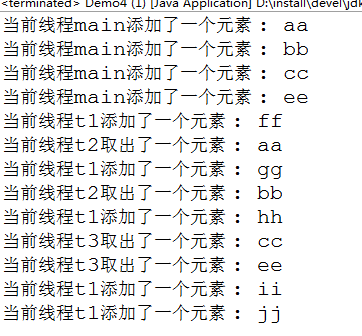
效果:
原文地址:http://1754966750.blog.51cto.com/7455444/1906113
