
标签:key sources with 内容 mem err cal 简单 启动
在AppDelegate.swift中配置ViewController.swift为启动后的第一个页面
import UIKit

@UIApplicationMain
class AppDelegate: UIResponder, UIApplicationDelegate {

    var window: UIWindow?


    func application(application: UIApplication, didFinishLaunchingWithOptions launchOptions: [NSObject: AnyObject]?) -> Bool {
        // 启动后的第一个页面
        self.window = UIWindow(frame: UIScreen.mainScreen().bounds);

        // 这里设置rootViewController为ViewController实例
        let vc = ViewController();
        self.window?.rootViewController = vc;//本行vc处填写你要选择的页面

        self.window?.backgroundColor = .whiteColor();
        self.window?.makeKeyAndVisible();
        return true;
    }
在ViewController.swift中简单写一下背景色
import UIKit

class ViewController: UIViewController {

    override func viewDidLoad() {
        super.viewDidLoad()
        // Do any additional setup after loading the view, typically from a nib.
        self.view.backgroundColor = .yellowColor();//背景色的设置
    }

    override func didReceiveMemoryWarning() {
        super.didReceiveMemoryWarning()
        // Dispose of any resources that can be recreated.
    }


}
选择相应【TARGETS】,选择【General】,找到如下两个配置项,并清空内容。
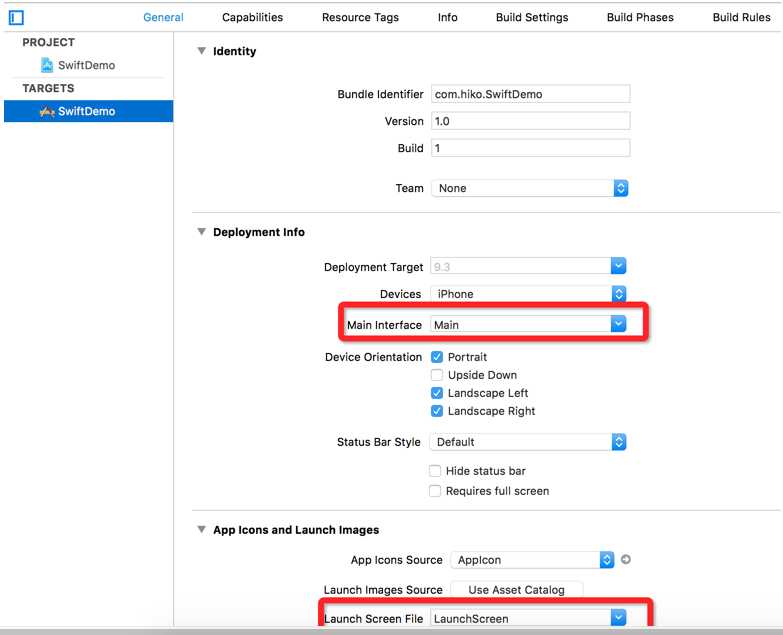
删除Main.storyboard和LaunchScreen.storyboard文件。
然后运行就出现了黄色的页面

标签:key sources with 内容 mem err cal 简单 启动
原文地址:http://www.cnblogs.com/niuni-623/p/6902523.html
