
标签:set 大小 tin none url 技术 -o int 分享
1.介绍
使用 zabbix_sender 发送采集的 WEB 状态值,使用 pycurl 来采集 WEB 状态。
2.实现
Python 脚本如下:

#!/usr/bin/env python
#coding=utf-8
import os
import sys
import fileinput
import pycurl
import logging
hostname = "Zabbix server"
zabbix_server = "127.0.0.1"
zabbix_sender = "/usr/local/zabbix/bin/zabbix_sender"
list = [‘www.test.com‘,‘cdn.test.com‘]
key = [‘HTTP_ResSize‘,‘HTTP_ResTime‘,‘HTTP_ResCode‘,‘HTTP_ResSpeed‘]
log_file = "/tmp/HTTP_Response.log"
logging.basicConfig(filename=log_file,level=logging.INFO,filemode=‘w‘)
run_cmd="%s -z %s -i %s > /tmp/HTTP_Response.temp" % (zabbix_sender,zabbix_server,log_file)
# print run_cmd

class Test():
        def __init__(self):
                self.contents = ‘‘
        def body_callback(self,buf):
                self.contents = self.contents + buf

def Check_Http(URL):
        t = Test()
        #gzip_test = file("gzip_test.txt", ‘w‘)
        c = pycurl.Curl()
        c.setopt(pycurl.WRITEFUNCTION,t.body_callback)
        #请求采用Gzip传输
        #c.setopt(pycurl.ENCODING, ‘gzip‘)
        try:
            c.setopt(pycurl.CONNECTTIMEOUT, 60) #链接超时
            c.setopt(pycurl.URL,URL)
            c.perform() #执行上述访问网址的操作
        except pycurl.error:
            print "URL %s" % URL

        Http_Document_size = c.getinfo(c.SIZE_DOWNLOAD)
        # Http_Download_speed = round((c.getinfo(pycurl.SPEED_DOWNLOAD) /1024),2)
        Http_Download_speed = round((c.getinfo(pycurl.SPEED_DOWNLOAD) ),2)
        Http_Total_time = round((c.getinfo(pycurl.TOTAL_TIME) * 1000),2)
        Http_Response_code = c.getinfo(pycurl.HTTP_CODE)
        logging.info(hostname +‘ ‘ +key[0] + ‘[‘ + k + ‘]‘ + ‘ ‘+str(Http_Document_size))
        logging.info(hostname +‘ ‘ +key[1] + ‘[‘ + k + ‘]‘ + ‘ ‘+str(Http_Total_time))
        logging.info(hostname +‘ ‘ +key[2] + ‘[‘ + k + ‘]‘ + ‘ ‘+str(Http_Response_code))
        logging.info(hostname +‘ ‘ +key[3] + ‘[‘ + k + ‘]‘ + ‘ ‘+str(Http_Download_speed))

def runCmd(command):
    for u in list:
            URL = u
            global k
            if u.startswith(‘https:‘):
                k = u.split(‘/‘)[2]
            else:
                k=u.split(‘/‘)[0]
                Check_Http(URL)

    for line in fileinput.input(log_file,inplace=1):
        print line.replace(‘INFO:root:‘,‘‘),
    return os.system(command)
runCmd(run_cmd)
如果需要监控多个网站,修改 list 里的网站地址 添加计划任务, 每 5 分钟采集一次
监控key:
响应时间:HTTP_ResTime[www.test.com]
状态码:HTTP_ResCode[www.test.com]
文档大小:HTTP_ResSize[www.test.com]
下载速度:HTTP_ResSpeed[www.test.com]
测试能否使用zabbix_sender正常工作:./zabbix_sender -s "Zabbix server" -z 127.0.0.1 -k HTTP_ResCode[www.test.com] -o 200
zabbix server 添加监控模板、监控项、触发器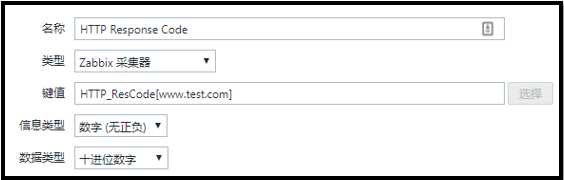
标签:set 大小 tin none url 技术 -o int 分享
原文地址:http://www.cnblogs.com/Mrhuangrui/p/7428856.html

