
标签:.com 斜杠 表达式 割点 int 本质 abd 去除 多个
就其本质而言,正则表达式(或 RE)是一种小型的、高度专业化的编程语言,(在Python中)它内嵌在Python中,并通过 re 模块实现。正则表达式模式被编译成一系列的字节码,然后由用 C 编写的匹配引擎执行。
RE字符:
元字符:. ^ $ * + ? { } [ ] | ( ) \
普通字符:字母数字
 1 import re
 2
 3 ret=re.findall(‘a..in‘,‘helloalvin‘)   #.匹配一个字符
 4 print(ret)#[‘alvin‘]
 5
 6
 7 ret=re.findall(‘^a...n‘,‘alvinhelloawwwn‘) #^从开头匹配
 8 print(ret)#[‘alvin‘]
 9
10
11 ret=re.findall(‘a...n$‘,‘alvinhelloawwwn‘)#$从末尾匹配
12 print(ret)#[‘awwwn‘]
13
14
15 ret=re.findall(‘a...n$‘,‘alvinhelloawwwn‘)
16 print(ret)#[‘awwwn‘]
17
18
19 ret=re.findall(‘abc*‘,‘abcccc‘)#贪婪匹配[0,+oo]   *前面的字母有0个或者多个
20 print(ret)#[‘abcccc‘]
21
22 ret=re.findall(‘abc+‘,‘abccc‘)#[1,+oo]   +前面的字母有0个或者多个
23 print(ret)#[‘abccc‘]
24
25 ret=re.findall(‘abc?‘,‘abccc‘)#[0,1]    ?前面的字母1个或者0个
26 print(ret)#[‘abc‘]
27
28
29 ret=re.findall(‘abc{1,4}‘,‘abccc‘)
30 print(ret)#[‘abccc‘] 贪婪匹配
注意:前面的*,+,?等都是贪婪匹配,也就是尽可能匹配,后面加?号使其变成惰性匹配
ret=re.findall(‘qta*?‘,‘qtaaaasd‘)
print(ret)  #[‘qt‘]
ret=re.findall(‘a[bc]d‘,‘abdacd‘)
print(ret)  #[‘abd‘, ‘acd‘]
ret=re.findall(‘a[a-z]d‘,‘abdacd‘)
print(ret) #[‘abd‘, ‘acd‘]
ret=re.findall(‘[.*,]‘,‘ab,da.c*d‘)
print(ret)#[‘,‘, ‘.‘, ‘*‘]
ret=re.findall(‘[^.*,]‘,‘ab,da.c*d‘)  #不包含字符集内的元素
print(ret) #  [‘a‘, ‘b‘, ‘d‘, ‘a‘, ‘c‘, ‘d‘]
ret=re.findall(‘[\d]‘,‘ab,da.c*d123‘)  #\d匹配任何数字 和[1-9]一样
print(ret)  #[‘1‘, ‘2‘, ‘3‘]
ret=re.findall(‘[\D]‘,‘ab,da.c*d123‘) #\D匹配所有不是数字的字符
print(ret)# [‘a‘, ‘b‘, ‘,‘, ‘d‘, ‘a‘, ‘.‘, ‘c‘, ‘*‘, ‘d‘]
ret=re.findall(‘[\w]‘,‘ab,da.c*d123‘)#\w匹配任何数字和字符类似[1-9a-zA-Z]
print(ret) #[‘a‘, ‘b‘, ‘d‘, ‘a‘, ‘c‘, ‘d‘, ‘1‘, ‘2‘, ‘3‘]
ret=re.findall(‘[\W]‘,‘ab,da.c*d123‘) #\W匹配任何不是数字和字符的
print(ret) #[‘,‘, ‘.‘, ‘*‘]
ret=re.findall(‘[\s]‘,‘ab,da.c*d123\t\n‘) #\s匹配任何空白字符
print(ret)  #[‘\t‘, ‘\n‘]
ret=re.findall(‘[\S]‘,‘ab,da.c*d123\t\n‘) #\S匹配任何不是空白字符
print(ret)  #[‘a‘, ‘b‘, ‘,‘, ‘d‘, ‘a‘, ‘.‘, ‘c‘, ‘*‘, ‘d‘, ‘1‘, ‘2‘, ‘3‘]
反斜杠后边跟元字符去除特殊功能,比如\.
反斜杠后边跟普通字符实现特殊功能,比如\d
\d 匹配任何十进制数;它相当于类 [0-9]。
\D 匹配任何非数字字符;它相当于类 [^0-9]。
\s 匹配任何空白字符;它相当于类 [ \t\n\r\f\v]。
\S 匹配任何非空白字符;它相当于类 [^ \t\n\r\f\v]。
\w 匹配任何字母数字字符;它相当于类 [a-zA-Z0-9_]。
\W 匹配任何非字母数字字符;它相当于类 [^a-zA-Z0-9_]
\b 匹配一个特殊字符边界,比如空格 ,&,#等
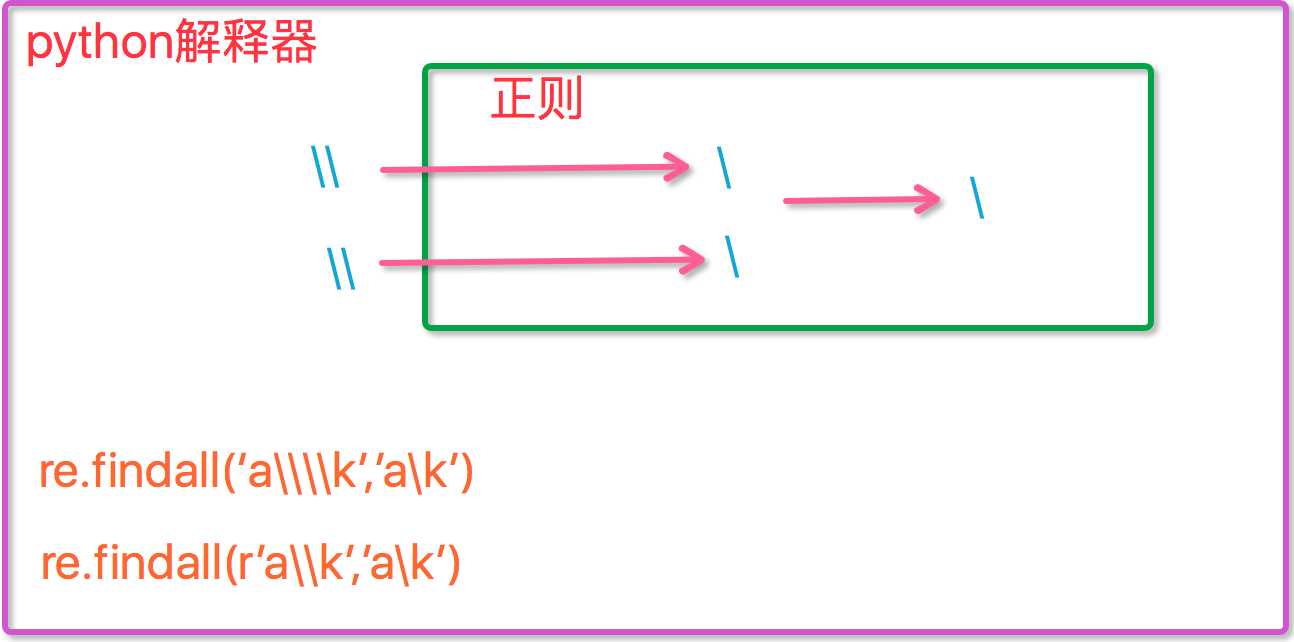
现在我们聊一聊\,先看下面两个匹配:
 1 #-----------------------------eg1:
 2 import re
 3 ret=re.findall(‘c\l‘,‘abc\le‘)
 4 print(ret)#[]
 5 ret=re.findall(‘c\\l‘,‘abc\le‘)
 6 print(ret)#[]
 7 ret=re.findall(‘c\\\\l‘,‘abc\le‘)
 8 print(ret)#[‘c\\l‘]
 9 ret=re.findall(r‘c\\l‘,‘abc\le‘)
10 print(ret)#[‘c\\l‘]  r说明再python用原生字符串
11
12 #-----------------------------eg2:
13 #之所以选择\b是因为\b在ASCII表中是有意义的
14 m = re.findall(‘\bblow‘, ‘blow‘)
15 print(m)
16 m = re.findall(r‘\bblow‘, ‘blow‘)
17 print(m)
1 m = re.findall(‘(bl)‘, ‘blow‘)  #整体匹配‘bl’
2 print(m)  #[‘bl‘]
ret=re.search(‘(ab)|\d‘,‘rabhdg8sd‘)  #或,从左开始匹配,如果有匹配出来,如果没有匹配右边的
print(ret.group())#ab
RE的五种基本操做
re.match(pattern, string)     # 从头匹配

re.search(pattern, string)    # 匹配整个字符串,直到找到一个匹配

re.split()            # 将匹配到的格式当做分割点对字符串分割成列表
>>>m = re.split("[0-9]", "alex1rain2jack3helen rachel8")
>>>print(m)
输出: [‘alex‘, ‘rain‘, ‘jack‘, ‘helen rachel‘, ‘‘]

re.findall()          # 找到所有要匹配的字符并返回列表格式

>>>m = re.findall("[0-9]", "alex1rain2jack3helen rachel8")
>>>print(m)<br>
输出:[‘1‘, ‘2‘, ‘3‘, ‘8‘]

re.sub(pattern, repl, string, count,flag)    # 替换匹配到的字符
m=re.sub("[0-9]","|", "alex1rain2jack3helen rachel8",count=2 )
print(m)
输出:alex|rain|jack3helen rachel8
标签:.com 斜杠 表达式 割点 int 本质 abd 去除 多个
原文地址:http://www.cnblogs.com/xiaoyaz/p/7625956.html
