
标签:type tar UNC san wax cad parameter lse 预处理
通过分析OpenCV.JS(官方下载地址 https://docs.opencv.org/_VERSION_/opencv.js)的白名单,我们可以了解目前官方PreBuild版本并没有实现QR识别。# Classes and methods whitelist
core = {‘‘: [‘absdiff‘, ‘add‘, ‘addWeighted‘, ‘bitwise_and‘, ‘bitwise_not‘, ‘bitwise_or‘, ‘bitwise_xor‘, ‘cartToPolar‘,\
‘compare‘, ‘convertScaleAbs‘, ‘copyMakeBorder‘, ‘countNonZero‘, ‘determinant‘, ‘dft‘, ‘divide‘, ‘eigen‘, \
‘exp‘, ‘flip‘, ‘getOptimalDFTSize‘,‘gemm‘, ‘hconcat‘, ‘inRange‘, ‘invert‘, ‘kmeans‘, ‘log‘, ‘magnitude‘, \
‘max‘, ‘mean‘, ‘meanStdDev‘, ‘merge‘, ‘min‘, ‘minMaxLoc‘, ‘mixChannels‘, ‘multiply‘, ‘norm‘, ‘normalize‘, \
‘perspectiveTransform‘, ‘polarToCart‘, ‘pow‘, ‘randn‘, ‘randu‘, ‘reduce‘, ‘repeat‘, ‘rotate‘, ‘setIdentity‘, ‘setRNGSeed‘, \
‘solve‘, ‘solvePoly‘, ‘split‘, ‘sqrt‘, ‘subtract‘, ‘trace‘, ‘transform‘, ‘transpose‘, ‘vconcat‘],
‘Algorithm‘: []}
imgproc = {‘‘: [‘Canny‘, ‘GaussianBlur‘, ‘Laplacian‘, ‘HoughLines‘, ‘HoughLinesP‘, ‘HoughCircles‘, ‘Scharr‘,‘Sobel‘, \
‘adaptiveThreshold‘,‘approxPolyDP‘,‘arcLength‘,‘bilateralFilter‘,‘blur‘,‘boundingRect‘,‘boxFilter‘,\
‘calcBackProject‘,‘calcHist‘,‘circle‘,‘compareHist‘,‘connectedComponents‘,‘connectedComponentsWithStats‘, \
‘contourArea‘, ‘convexHull‘, ‘convexityDefects‘, ‘cornerHarris‘,‘cornerMinEigenVal‘,‘createCLAHE‘, \
‘createLineSegmentDetector‘,‘cvtColor‘,‘demosaicing‘,‘dilate‘, ‘distanceTransform‘,‘distanceTransformWithLabels‘, \
‘drawContours‘,‘ellipse‘,‘ellipse2Poly‘,‘equalizeHist‘,‘erode‘, ‘filter2D‘, ‘findContours‘,‘fitEllipse‘, \
‘fitLine‘, ‘floodFill‘,‘getAffineTransform‘, ‘getPerspectiveTransform‘, ‘getRotationMatrix2D‘, ‘getStructuringElement‘, \
‘goodFeaturesToTrack‘,‘grabCut‘,‘initUndistortRectifyMap‘, ‘integral‘,‘integral2‘, ‘isContourConvex‘, ‘line‘, \
‘matchShapes‘, ‘matchTemplate‘,‘medianBlur‘, ‘minAreaRect‘, ‘minEnclosingCircle‘, ‘moments‘, ‘morphologyEx‘, \
‘pointPolygonTest‘, ‘putText‘,‘pyrDown‘,‘pyrUp‘,‘rectangle‘,‘remap‘, ‘resize‘,‘sepFilter2D‘,‘threshold‘, \
‘undistort‘,‘warpAffine‘,‘warpPerspective‘,‘warpPolar‘,‘watershed‘, \
‘fillPoly‘, ‘fillConvexPoly‘],
‘CLAHE‘: [‘apply‘, ‘collectGarbage‘, ‘getClipLimit‘, ‘getTilesGridSize‘, ‘setClipLimit‘, ‘setTilesGridSize‘]}
objdetect = {‘‘: [‘groupRectangles‘],
‘HOGDescriptor‘: [‘load‘, ‘HOGDescriptor‘, ‘getDefaultPeopleDetector‘, ‘getDaimlerPeopleDetector‘, ‘setSVMDetector‘, ‘detectMultiScale‘],
‘CascadeClassifier‘: [‘load‘, ‘detectMultiScale2‘, ‘CascadeClassifier‘, ‘detectMultiScale3‘, ‘empty‘, ‘detectMultiScale‘]}
video = {‘‘: [‘CamShift‘, ‘calcOpticalFlowFarneback‘, ‘calcOpticalFlowPyrLK‘, ‘createBackgroundSubtractorMOG2‘, \
‘findTransformECC‘, ‘meanShift‘],
‘BackgroundSubtractorMOG2‘: [‘BackgroundSubtractorMOG2‘, ‘apply‘],
‘BackgroundSubtractor‘: [‘apply‘, ‘getBackgroundImage‘]}
dnn = {‘dnn_Net‘: [‘setInput‘, ‘forward‘],
‘‘: [‘readNetFromCaffe‘, ‘readNetFromTensorflow‘, ‘readNetFromTorch‘, ‘readNetFromDarknet‘,
‘readNetFromONNX‘, ‘readNet‘, ‘blobFromImage‘]}
features2d = {‘Feature2D‘: [‘detect‘, ‘compute‘, ‘detectAndCompute‘, ‘descriptorSize‘, ‘descriptorType‘, ‘defaultNorm‘, ‘empty‘, ‘getDefaultName‘],
‘BRISK‘: [‘create‘, ‘getDefaultName‘],
‘ORB‘: [‘create‘, ‘setMaxFeatures‘, ‘setScaleFactor‘, ‘setNLevels‘, ‘setEdgeThreshold‘, ‘setFirstLevel‘, ‘setWTA_K‘, ‘setScoreType‘, ‘setPatchSize‘, ‘getFastThreshold‘, ‘getDefaultName‘],
‘MSER‘: [‘create‘, ‘detectRegions‘, ‘setDelta‘, ‘getDelta‘, ‘setMinArea‘, ‘getMinArea‘, ‘setMaxArea‘, ‘getMaxArea‘, ‘setPass2Only‘, ‘getPass2Only‘, ‘getDefaultName‘],
‘FastFeatureDetector‘: [‘create‘, ‘setThreshold‘, ‘getThreshold‘, ‘setNonmaxSuppression‘, ‘getNonmaxSuppression‘, ‘setType‘, ‘getType‘, ‘getDefaultName‘],
‘AgastFeatureDetector‘: [‘create‘, ‘setThreshold‘, ‘getThreshold‘, ‘setNonmaxSuppression‘, ‘getNonmaxSuppression‘, ‘setType‘, ‘getType‘, ‘getDefaultName‘],
‘GFTTDetector‘: [‘create‘, ‘setMaxFeatures‘, ‘getMaxFeatures‘, ‘setQualityLevel‘, ‘getQualityLevel‘, ‘setMinDistance‘, ‘getMinDistance‘, ‘setBlockSize‘, ‘getBlockSize‘, ‘setHarrisDetector‘, ‘getHarrisDetector‘, ‘setK‘, ‘getK‘, ‘getDefaultName‘],
# ‘SimpleBlobDetector‘: [‘create‘],
‘KAZE‘: [‘create‘, ‘setExtended‘, ‘getExtended‘, ‘setUpright‘, ‘getUpright‘, ‘setThreshold‘, ‘getThreshold‘, ‘setNOctaves‘, ‘getNOctaves‘, ‘setNOctaveLayers‘, ‘getNOctaveLayers‘, ‘setDiffusivity‘, ‘getDiffusivity‘, ‘getDefaultName‘],
‘AKAZE‘: [‘create‘, ‘setDescriptorType‘, ‘getDescriptorType‘, ‘setDescriptorSize‘, ‘getDescriptorSize‘, ‘setDescriptorChannels‘, ‘getDescriptorChannels‘, ‘setThreshold‘, ‘getThreshold‘, ‘setNOctaves‘, ‘getNOctaves‘, ‘setNOctaveLayers‘, ‘getNOctaveLayers‘, ‘setDiffusivity‘, ‘getDiffusivity‘, ‘getDefaultName‘],
‘DescriptorMatcher‘: [‘add‘, ‘clear‘, ‘empty‘, ‘isMaskSupported‘, ‘train‘, ‘match‘, ‘knnMatch‘, ‘radiusMatch‘, ‘clone‘, ‘create‘],
‘BFMatcher‘: [‘isMaskSupported‘, ‘create‘],
‘‘: [‘drawKeypoints‘, ‘drawMatches‘, ‘drawMatchesKnn‘]}
photo = {‘‘: [‘createAlignMTB‘, ‘createCalibrateDebevec‘, ‘createCalibrateRobertson‘, \
‘createMergeDebevec‘, ‘createMergeMertens‘, ‘createMergeRobertson‘, \
‘createTonemapDrago‘, ‘createTonemapMantiuk‘, ‘createTonemapReinhard‘, ‘inpaint‘],
‘CalibrateCRF‘: [‘process‘],
‘AlignMTB‘ : [‘calculateShift‘, ‘shiftMat‘, ‘computeBitmaps‘, ‘getMaxBits‘, ‘setMaxBits‘, \
‘getExcludeRange‘, ‘setExcludeRange‘, ‘getCut‘, ‘setCut‘],
‘CalibrateDebevec‘ : [‘getLambda‘, ‘setLambda‘, ‘getSamples‘, ‘setSamples‘, ‘getRandom‘, ‘setRandom‘],
‘CalibrateRobertson‘ : [‘getMaxIter‘, ‘setMaxIter‘, ‘getThreshold‘, ‘setThreshold‘, ‘getRadiance‘],
‘MergeExposures‘ : [‘process‘],
‘MergeDebevec‘ : [‘process‘],
‘MergeMertens‘ : [‘process‘, ‘getContrastWeight‘, ‘setContrastWeight‘, ‘getSaturationWeight‘, \
‘setSaturationWeight‘, ‘getExposureWeight‘, ‘setExposureWeight‘],
‘MergeRobertson‘ : [‘process‘],
‘Tonemap‘ : [‘process‘ , ‘getGamma‘, ‘setGamma‘],
‘TonemapDrago‘ : [‘getSaturation‘, ‘setSaturation‘, ‘getBias‘, ‘setBias‘, \
‘getSigmaColor‘, ‘setSigmaColor‘, ‘getSigmaSpace‘,‘setSigmaSpace‘],
‘TonemapMantiuk‘ : [‘getScale‘, ‘setScale‘, ‘getSaturation‘, ‘setSaturation‘],
‘TonemapReinhard‘ : [‘getIntensity‘, ‘setIntensity‘, ‘getLightAdaptation‘, ‘setLightAdaptation‘, \
‘getColorAdaptation‘, ‘setColorAdaptation‘]
}
aruco = {‘‘: [‘detectMarkers‘, ‘drawDetectedMarkers‘, ‘drawAxis‘, ‘estimatePoseSingleMarkers‘, ‘estimatePoseBoard‘, ‘estimatePoseCharucoBoard‘, ‘interpolateCornersCharuco‘, ‘drawDetectedCornersCharuco‘],
‘aruco_Dictionary‘: [‘get‘, ‘drawMarker‘],
‘aruco_Board‘: [‘create‘],
‘aruco_GridBoard‘: [‘create‘, ‘draw‘],
‘aruco_CharucoBoard‘: [‘create‘, ‘draw‘],
}
calib3d = {‘‘: [‘findHomography‘, ‘calibrateCameraExtended‘, ‘drawFrameAxes‘, ‘estimateAffine2D‘, ‘getDefaultNewCameraMatrix‘, ‘initUndistortRectifyMap‘, ‘Rodrigues‘]}
white_list = makeWhiteList([core, imgproc, objdetect, video, dnn, features2d, photo, aruco, calib3d])
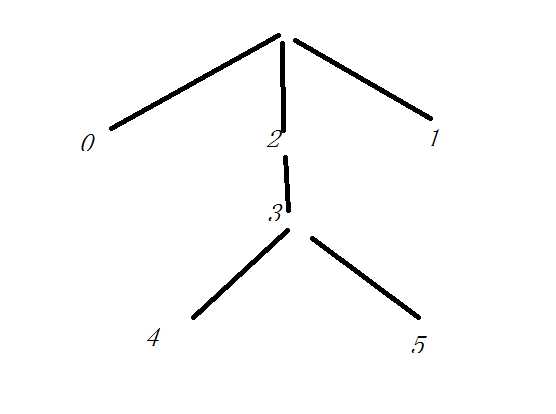
 ,这种重复包含的特性,在图上只有不容易重复的三处,这是具有排它性的。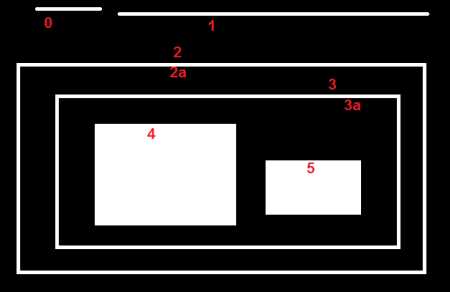
#include "opencv2/highgui/highgui.hpp"
#include "opencv2/imgproc/imgproc.hpp"
#include <iostream>
#include <stdio.h>
#include <stdlib.h>
#include <math.h>
using namespace cv;
using namespace std;
//找到所提取轮廓的中心点
//在提取的中心小正方形的边界上每隔周长个像素提取一个点的坐标,求所提取四个点的平均坐标(即为小正方形的大致中心)
Point Center_cal(vector<vector<Point> > contours,int i)
{
    int centerx=0,centery=0,n=contours[i].size();
    centerx = (contours[i][n/4].x + contours[i][n*2/4].x + contours[i][3*n/4].x + contours[i][n-1].x)/4;
    centery = (contours[i][n/4].y + contours[i][n*2/4].y + contours[i][3*n/4].y + contours[i][n-1].y)/4;
    Point point1=Point(centerx,centery);
    return point1;
}
int main( int argc, char** argv[] )
{
    Mat src = imread( "e:/sandbox/qrcode.jpg", 1 );
    resize(src,src,Size(800,600));//标准大小
    Mat src_gray;
    Mat src_all=src.clone();
    Mat threshold_output;
    vector<vector<Point> > contours,contours2;
    vector<Vec4i> hierarchy;
    //预处理
    cvtColor( src, src_gray, CV_BGR2GRAY );
    blur( src_gray, src_gray, Size(3,3) ); //模糊,去除毛刺
    threshold( src_gray, threshold_output, 100, 255, THRESH_OTSU );
    //寻找轮廓
    //第一个参数是输入图像 2值化的
    //第二个参数是内存存储器,FindContours找到的轮廓放到内存里面。
    //第三个参数是层级,**[Next, Previous, First_Child, Parent]** 的vector
    //第四个参数是类型,采用树结构
    //第五个参数是节点拟合模式,这里是全部寻找
    findContours( threshold_output, contours, hierarchy,  CV_RETR_TREE, CHAIN_APPROX_NONE, Point(0, 0) );
    //轮廓筛选
    int c=0,ic=0,area=0;
    int parentIdx=-1;
    for( int i = 0; i< contours.size(); i++ )
    {
        //hierarchy[i][2] != -1 表示不是最外面的轮廓
        if (hierarchy[i][2] != -1 && ic==0)
        {
            parentIdx = i;
            ic++;
        }
        else if (hierarchy[i][2] != -1)
        {
            ic++;
        }
        //最外面的清0
        else if(hierarchy[i][2] == -1)
        {
            ic = 0;
            parentIdx = -1;
        }
        //找到定位点信息
        if ( ic >= 2)
        {
            contours2.push_back(contours[parentIdx]);
            ic = 0;
            parentIdx = -1;
        }
    }
    //填充定位点
    for(int i=0; i<contours2.size(); i++)
        drawContours( src_all, contours2, i,  CV_RGB(0,255,0) , -1 );
    //连接定位点
    Point point[3];
    for(int i=0; i<contours2.size(); i++)
    {
        point[i] = Center_cal( contours2, i );
    }

    line(src_all,point[0],point[1],Scalar(0,0,255),2);
    line(src_all,point[1],point[2],Scalar(0,0,255),2);
    line(src_all,point[0],point[2],Scalar(0,0,255),2);

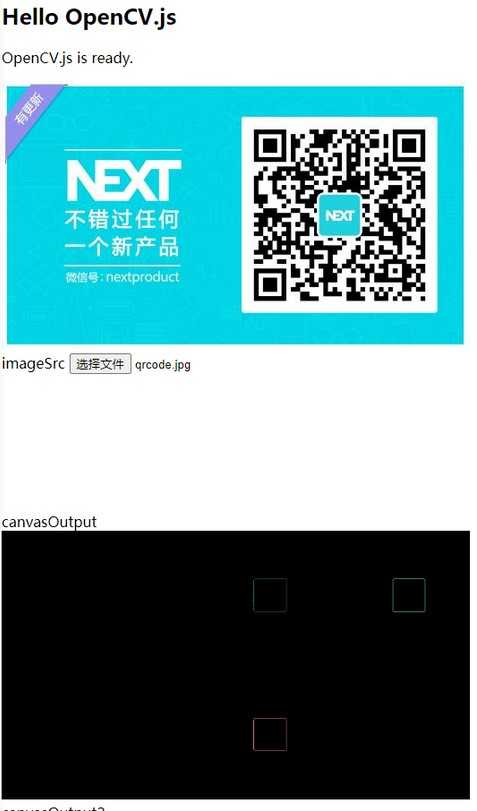
    imshow( "结果", src_all );
    waitKey(0);
    return(0);
}
标签:type tar UNC san wax cad parameter lse 预处理
原文地址:https://www.cnblogs.com/jsxyhelu/p/13040487.html
