
Spark Streaming的Job到底是如何运行的,我们下面以一个例子来解析一下:
package com.dt.spark.streaming

import com.dt.spark.common.ConnectPool
import org.apache.spark.SparkConf
import org.apache.spark.streaming.{Seconds, StreamingContext}


/**
 * 以网站热词排名为例,将处理结果写到MySQL中
 * Created by dinglq on 2016/5/3.
 */
object WriteDataToMySQL {
  def main(args: Array[String]) {
    val conf = new SparkConf().setAppName("WriteDataToMySQL")
    val ssc = new StreamingContext(conf,Seconds(5))
    // 假设socket输入的数据格式为:searchKeyword,time
    val ItemsStream = ssc.socketTextStream("spark-master",9999)
    // 将输入数据变成(searchKeyword,1)
    var ItemPairs = ItemsStream.map(line =>(line.split(",")(0),1))

     val ItemCount = ItemPairs.reduceByKeyAndWindow((v1:Int,v2:Int)=> v1+v2,Seconds(60),Seconds(10))
    //ssc.checkpoint("/user/checkpoints/")
    // val ItemCount = ItemPairs.reduceByKeyAndWindow((v1:Int,v2:Int)=> v1+v2,(v1:Int,v2:Int)=> v1-v2,Seconds(60),Seconds(10))
    /**
     * 接下来需要对热词的频率进行排序,而DStream没有提供sort的方法。那么我们可以实现transform函数,用RDD的sortByKey实现
     */
    val hottestWord = ItemCount.transform(itemRDD => {
      val top3 = itemRDD.map(pair => (pair._2, pair._1))
        .sortByKey(false).map(pair => (pair._2, pair._1)).take(3)
      ssc.sparkContext.makeRDD(top3)
    })

    hottestWord.foreachRDD(rdd => {
      rdd.foreachPartition(partitionOfRecords =>{
        val conn = ConnectPool.getConnection
        conn.setAutoCommit(false);  //设为手动提交
        val  stmt = conn.createStatement();

        partitionOfRecords.foreach( record => {

          stmt.addBatch("insert into searchKeyWord (insert_time,keyword,search_count) values (now(),‘"+record._1+"‘,‘"+record._2+"‘)");
        })

        stmt.executeBatch();
        conn.commit();  //提交事务

      })
    })

    ssc.start()
    ssc.awaitTermination()
    ssc.stop()

  }
}
将代码提交至Spark 集群运行:
1.程序最初会初始化StreamingContext
def this(conf: SparkConf, batchDuration: Duration) = {
  this(StreamingContext.createNewSparkContext(conf), null, batchDuration)
}
在StreamingContext的构造方法中会新建一个SparkContext实例,从这点也可以说明Streaming是运行在Spark Core 之上的。
StreamingContext初始化的过程中会做如下事情
2.构造DStreamGraph
private[streaming] val graph: DStreamGraph = {
  if (isCheckpointPresent) {
    cp_.graph.setContext(this)
    cp_.graph.restoreCheckpointData()
    cp_.graph
  } else {
    require(batchDur_ != null, "Batch duration for StreamingContext cannot be null")
    val newGraph = new DStreamGraph()
    newGraph.setBatchDuration(batchDur_)
    newGraph
  }
}
3.构造JobScheduler对象
private[streaming] val scheduler = new JobScheduler(this)
而在JobScheduler对象初始化的过程会构造如下对象:JobGenerator、StreamingListenerBus
4.构造JobGenerator对象(JobScheduler.scala的第50行)
private val jobGenerator = new JobGenerator(this)
5.而JobGenerator在实例化时,则会构造一个RecurringTimer(JobGenerator.scala的第58行)
private val timer = new RecurringTimer(clock, ssc.graph.batchDuration.milliseconds,
  longTime => eventLoop.post(GenerateJobs(new Time(longTime))), "JobGenerator")
6.构造StreamingListenerBus对象(JobScheduler.scala的第52行)
val listenerBus = new StreamingListenerBus()
到此,StreamingContext实例化的工作完成(以上只是说明了主要的对象生成,并不完整,请参考源代码)
7.定义输入流
val ItemsStream = ssc.socketTextStream("spark-master",9999)8.此方法会生成一个SocketInputDStream
def socketTextStream(
    hostname: String,
    port: Int,
    storageLevel: StorageLevel = StorageLevel.MEMORY_AND_DISK_SER_2
  ): ReceiverInputDStream[String] = withNamedScope("socket text stream") {
  socketStream[String](hostname, port, SocketReceiver.bytesToLines, storageLevel)
}

def socketStream[T: ClassTag](
    hostname: String,
    port: Int,
    converter: (InputStream) => Iterator[T],
    storageLevel: StorageLevel
  ): ReceiverInputDStream[T] = {
  new SocketInputDStream[T](this, hostname, port, converter, storageLevel)
}
SocketInputDStream的继承关系如下图:
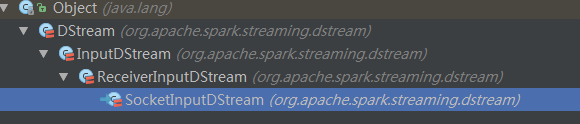
9.在InputDStream的构造过程中,会将此输入流SocketInputDStream添加到DStreamGraph的inputStreams数据结构中(InputDStream.scala的第47行)
ssc.graph.addInputStream(this)
并且InputDStream和和DStreamGraph实例相互引用(DStreamGraph的第83行)
def addInputStream(inputStream: InputDStream[_]) {
  this.synchronized {
    inputStream.setGraph(this)
    inputStreams += inputStream
  }
}
10.在ReceiverInputDStream构建的过程中会初始化一个ReceiverRateController
override protected[streaming] val rateController: Option[RateController] = {
  if (RateController.isBackPressureEnabled(ssc.conf)) {
    Some(new ReceiverRateController(id, RateEstimator.create(ssc.conf, ssc.graph.batchDuration)))
  } else {
    None
  }
}特别说明:在DStreamGraph中有个outputStreams,表示SparkStreaming程序的输出流,在需要数据输出时,例如print(最终也会调用foreachRDD方法),foreachRDD等都会讲此DStream注册给outputStreams。(DStream.scala的第684行)
private def foreachRDD(
    foreachFunc: (RDD[T], Time) => Unit,
    displayInnerRDDOps: Boolean): Unit = {
  new ForEachDStream(this,
    context.sparkContext.clean(foreachFunc, false), displayInnerRDDOps).register()
}
这里的context就是StreamingContext。
11.将DStream注册给DStreamGraph(DStream.scala的第969行)
private[streaming] def register(): DStream[T] = {
  ssc.graph.addOutputStream(this)
  this
}
所以Streaming程序的整个业务代码,就是将InputDStream经过各种转换计算变成OutputDStream的过程。
12. StreamingContext启动
ssc.start()
启动过程中,会判断StreamingContext的状态,它有三个状态INITIALIZED、ACTIVE、STOP。只有状态为INITAILIZED才允许启动。代码如下
StreamingContext.scala的第594行
def start(): Unit = synchronized {
  state match {
    case INITIALIZED =>
      startSite.set(DStream.getCreationSite())
      StreamingContext.ACTIVATION_LOCK.synchronized {
        StreamingContext.assertNoOtherContextIsActive()
        try {
          validate()

          // Start the streaming scheduler in a new thread, so that thread local properties
          // like call sites and job groups can be reset without affecting those of the
          // current thread.
          ThreadUtils.runInNewThread("streaming-start") {
            sparkContext.setCallSite(startSite.get)
            sparkContext.clearJobGroup()
            sparkContext.setLocalProperty(SparkContext.SPARK_JOB_INTERRUPT_ON_CANCEL, "false")
            scheduler.start()
          }
          state = StreamingContextState.ACTIVE
        } catch {
          case NonFatal(e) =>
            logError("Error starting the context, marking it as stopped", e)
            scheduler.stop(false)
            state = StreamingContextState.STOPPED
            throw e
        }
        StreamingContext.setActiveContext(this)
      }
      shutdownHookRef = ShutdownHookManager.addShutdownHook(
        StreamingContext.SHUTDOWN_HOOK_PRIORITY)(stopOnShutdown)
      // Registering Streaming Metrics at the start of the StreamingContext
      assert(env.metricsSystem != null)
      env.metricsSystem.registerSource(streamingSource)
      uiTab.foreach(_.attach())
      logInfo("StreamingContext started")
    case ACTIVE =>
      logWarning("StreamingContext has already been started")
    case STOPPED =>
      throw new IllegalStateException("StreamingContext has already been stopped")
  }
}
13.调用JobScheduler的start方法(scheduler.start())
JobScheduler.scala的第62行
def start(): Unit = synchronized {
  if (eventLoop != null) return // scheduler has already been started

  logDebug("Starting JobScheduler")
  eventLoop = new EventLoop[JobSchedulerEvent]("JobScheduler") {
    override protected def onReceive(event: JobSchedulerEvent): Unit = processEvent(event)

    override protected def onError(e: Throwable): Unit = reportError("Error in job scheduler", e)
  }
  eventLoop.start()

  // attach rate controllers of input streams to receive batch completion updates
  for {
    inputDStream <- ssc.graph.getInputStreams
    rateController <- inputDStream.rateController
  } ssc.addStreamingListener(rateController)

  listenerBus.start(ssc.sparkContext)
  receiverTracker = new ReceiverTracker(ssc)
  inputInfoTracker = new InputInfoTracker(ssc)
  receiverTracker.start()
  jobGenerator.start()
  logInfo("Started JobScheduler")
}
14.在上段代码中,首先会构造一个EventLoop[JobSchedulerEvent]对象,并调用其start方法
eventLoop.start()
15.让JobScheduler的StreamingListenerBus对象监听输入流的ReceiverRateController对象
  for {
    inputDStream <- ssc.graph.getInputStreams
    rateController <- inputDStream.rateController
  } ssc.addStreamingListener(rateController)
StreamingContext.scala的第536行
def addStreamingListener(streamingListener: StreamingListener) {
  scheduler.listenerBus.addListener(streamingListener)
}
16.调用StreamingListenerBus的start方法
listenerBus.start(ssc.sparkContext)
17.实例化receiverTracker和InputInfoTracker,并调用receiverTracker的start方法
receiverTracker = new ReceiverTracker(ssc)
inputInfoTracker = new InputInfoTracker(ssc)
receiverTracker.start()
18.在receiverTracker的start方法中,会构造一个ReceiverTrackerEndpoint对象(ReceiverTracker.scala的第149行)
/** Start the endpoint and receiver execution thread. */
def start(): Unit = synchronized {
  if (isTrackerStarted) {
    throw new SparkException("ReceiverTracker already started")
  }

  if (!receiverInputStreams.isEmpty) {
    endpoint = ssc.env.rpcEnv.setupEndpoint(
      "ReceiverTracker", new ReceiverTrackerEndpoint(ssc.env.rpcEnv))
    if (!skipReceiverLaunch) launchReceivers()
    logInfo("ReceiverTracker started")
    trackerState = Started
  }
}
19.获取各个InputDStream的receiver,并且在相应的worker节点启动Receiver 。ReceiverTracker.scala的第413行
/**
 * Get the receivers from the ReceiverInputDStreams, distributes them to the
 * worker nodes as a parallel collection, and runs them.
 */
private def launchReceivers(): Unit = {
  val receivers = receiverInputStreams.map(nis => {
    val rcvr = nis.getReceiver()
    rcvr.setReceiverId(nis.id)
    rcvr
  })

  runDummySparkJob()

  logInfo("Starting " + receivers.length + " receivers")
  endpoint.send(StartAllReceivers(receivers))
}
20.ReceiverTrackerEndpoint接收到StartAllReceivers消息,并做如下处理
ReceiverTracker.scala的第449行
case StartAllReceivers(receivers) =>
  val scheduledLocations = schedulingPolicy.scheduleReceivers(receivers, getExecutors)
  for (receiver <- receivers) {
    val executors = scheduledLocations(receiver.streamId)
    updateReceiverScheduledExecutors(receiver.streamId, executors)
    receiverPreferredLocations(receiver.streamId) = receiver.preferredLocation
    startReceiver(receiver, executors)
  }
在Executor上启动receiver,此处可以得知,receiver可以有多个
21.然后回到13步的代码,调用JobGenerator.start()
JobGenerator.scala的第78行
/** Start generation of jobs */
def start(): Unit = synchronized {
  if (eventLoop != null) return // generator has already been started

  // Call checkpointWriter here to initialize it before eventLoop uses it to avoid a deadlock.
  // See SPARK-10125
  checkpointWriter

  eventLoop = new EventLoop[JobGeneratorEvent]("JobGenerator") {
    override protected def onReceive(event: JobGeneratorEvent): Unit = processEvent(event)

    override protected def onError(e: Throwable): Unit = {
      jobScheduler.reportError("Error in job generator", e)
    }
  }
  eventLoop.start()

  if (ssc.isCheckpointPresent) {
    restart()
  } else {
    startFirstTime()
  }
}
22.构造EventLoop[JobGeneratorEvent],并调用其start方法
eventLoop.start()
23.判断当前程序启动时,是否使用Checkpoint数据做恢复,来选择调用restart或者startFirstTime方法。我们的代码将调用startFirstTime()
JobGenerator.scala的第190行
private def startFirstTime() {
  val startTime = new Time(timer.getStartTime())
  graph.start(startTime - graph.batchDuration)
  timer.start(startTime.milliseconds)
  logInfo("Started JobGenerator at " + startTime)
}
24.调用DStreamGraph的start方法
def start(time: Time) {
  this.synchronized {
    require(zeroTime == null, "DStream graph computation already started")
    zeroTime = time
    startTime = time
    outputStreams.foreach(_.initialize(zeroTime))
    outputStreams.foreach(_.remember(rememberDuration))
    outputStreams.foreach(_.validateAtStart)
    inputStreams.par.foreach(_.start())
  }
}
此时,InputDStream启动,并开始接收数据。
InputDStream和ReceiverInputDStream的start方法都是空的。
InputDStream.scala的第110行
/** Method called to start receiving data. Subclasses must implement this method. */
def start()
ReceiverInputDStream.scala的第63行
// Nothing to start or stop as both taken care of by the ReceiverTracker.
def start() {}
而SocketInputDStream没有定义start方法,所以
inputStreams.par.foreach(_.start())
并没有做任何的事情,那么输入流到底是怎么被触发并开始接收数据的呢?
我们再看上面的第20步:
startReceiver(receiver, executors)
代码的具体实现在ReceiverTracker.scala的545行
private def startReceiver(
    receiver: Receiver[_],
    scheduledLocations: Seq[TaskLocation]): Unit = {
  def shouldStartReceiver: Boolean = {
    // It‘s okay to start when trackerState is Initialized or Started
    !(isTrackerStopping || isTrackerStopped)
  }

  val receiverId = receiver.streamId
  if (!shouldStartReceiver) {
    onReceiverJobFinish(receiverId)
    return
  }

  val checkpointDirOption = Option(ssc.checkpointDir)
  val serializableHadoopConf =
    new SerializableConfiguration(ssc.sparkContext.hadoopConfiguration)

  // Function to start the receiver on the worker node
  val startReceiverFunc: Iterator[Receiver[_]] => Unit =
    (iterator: Iterator[Receiver[_]]) => {
      if (!iterator.hasNext) {
        throw new SparkException(
          "Could not start receiver as object not found.")
      }
      if (TaskContext.get().attemptNumber() == 0) {
        val receiver = iterator.next()
        assert(iterator.hasNext == false)
        val supervisor = new ReceiverSupervisorImpl(
          receiver, SparkEnv.get, serializableHadoopConf.value, checkpointDirOption)
        supervisor.start()
        supervisor.awaitTermination()
      } else {
        // It‘s restarted by TaskScheduler, but we want to reschedule it again. So exit it.
      }
    }

  // Create the RDD using the scheduledLocations to run the receiver in a Spark job
  val receiverRDD: RDD[Receiver[_]] =
    if (scheduledLocations.isEmpty) {
      ssc.sc.makeRDD(Seq(receiver), 1)
    } else {
      val preferredLocations = scheduledLocations.map(_.toString).distinct
      ssc.sc.makeRDD(Seq(receiver -> preferredLocations))
    }
  receiverRDD.setName(s"Receiver $receiverId")
  ssc.sparkContext.setJobDescription(s"Streaming job running receiver $receiverId")
  ssc.sparkContext.setCallSite(Option(ssc.getStartSite()).getOrElse(Utils.getCallSite()))

  val future = ssc.sparkContext.submitJob[Receiver[_], Unit, Unit](
    receiverRDD, startReceiverFunc, Seq(0), (_, _) => Unit, ())
  // We will keep restarting the receiver job until ReceiverTracker is stopped
  future.onComplete {
    case Success(_) =>
      if (!shouldStartReceiver) {
        onReceiverJobFinish(receiverId)
      } else {
        logInfo(s"Restarting Receiver $receiverId")
        self.send(RestartReceiver(receiver))
      }
    case Failure(e) =>
      if (!shouldStartReceiver) {
        onReceiverJobFinish(receiverId)
      } else {
        logError("Receiver has been stopped. Try to restart it.", e)
        logInfo(s"Restarting Receiver $receiverId")
        self.send(RestartReceiver(receiver))
      }
  }(submitJobThreadPool)
  logInfo(s"Receiver ${receiver.streamId} started")
}
它会将Receiver封装成RDD,以Job的方式提交到Spark集群中。submitJob的第二个参数,是一个函数,它的功能是在worker节点上启动receiver
val supervisor = new ReceiverSupervisorImpl(
  receiver, SparkEnv.get, serializableHadoopConf.value, checkpointDirOption)
supervisor.start()
supervisor.awaitTermination()
在supervisor.start方法中会调用如下代码
ReceiverSupervisor.scala的127行
/** Start the supervisor */
def start() {
  onStart()
  startReceiver()
}
在startReceiver中,会调用receiver的Onstart方法,启动receiver。
注:这里要弄清楚ReceiverInputDStream和Recevier的区别。Receiver是具体接收数据的,而ReceiverInputDStream是对Receiver做了一成封装,将数据转换成DStream 。
我们本例中的Receiver是通过SocketInputDStream的getReceiver方法获取的(在第19步的时候被调用)。
ReceiverInputDStream.scala的42行
def getReceiver(): Receiver[T] = {
  new SocketReceiver(host, port, bytesToObjects, storageLevel)
}
而SocketReceiver会不断的从Socket中获取数据。
我们看看SocketReceiver的onStart方法:
def onStart() {
  // Start the thread that receives data over a connection
  new Thread("Socket Receiver") {
    setDaemon(true)
    override def run() { receive() }
  }.start()
}
/** Create a socket connection and receive data until receiver is stopped */
def receive() {
var socket: Socket = null
try {
logInfo("Connecting to " + host + ":" + port)
socket = new Socket(host, port)
logInfo("Connected to " + host + ":" + port)
val iterator = bytesToObjects(socket.getInputStream())
while(!isStopped && iterator.hasNext) {
store(iterator.next)
}
if (!isStopped()) {
restart("Socket data stream had no more data")
} else {
logInfo("Stopped receiving")
}
} catch {
case e: java.net.ConnectException =>
restart("Error connecting to " + host + ":" + port, e)
case NonFatal(e) =>
logWarning("Error receiving data", e)
restart("Error receiving data", e)
} finally {
if (socket != null) {
socket.close()
logInfo("Closed socket to " + host + ":" + port)
}
}
}到目前为止,我们的Receiver启动并接收数据啦。Receiver的启动是以Spark Job的方式启动的。
25.
未完待续...
本文出自 “叮咚” 博客,请务必保留此出处http://lqding.blog.51cto.com/9123978/1771017
第5课:基于案例一节课贯通Spark Streaming流计算框架的运行源码
原文地址:http://lqding.blog.51cto.com/9123978/1771017
