
标签:
import java.lang.reflect.*;

public class ClassDemo
{
 public static void main(String[] args)
 {
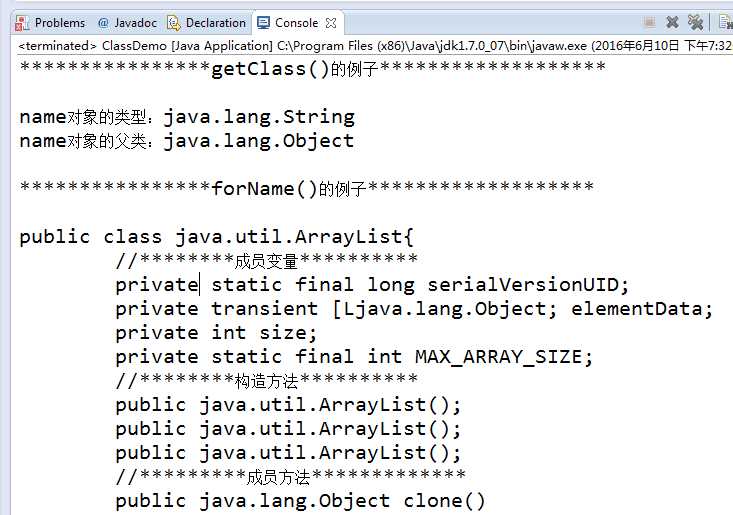
  System.out.println("****************getClass()的例子*******************\n");
  String name="john";
  //获得name对象的Class实例
  Class stringClass=name.getClass();
  //下面可以用stringClass实例获取name对象的相关信息,可以看API文档,这里只举两个方法
  System.out.println("name对象的类型:"+stringClass.getName());
  System.out.println("name对象的父类:"+stringClass.getSuperclass().getName());

System.out.println("\n****************forName()的例子*******************\n");
  //举forName()的例子
  //动态加载java.util.ArrayList类
  //得到类的Class实例后利用Class的方法取得类相关信息
  //里面有好多方法我就不解释了,你可以参考API文档
  try
  {
   Class c=Class.forName("java.util.ArrayList");
   int mod=c.getModifiers();
   System.out.print(Modifier.toString(mod));
   if(Modifier.isInterface(mod))
    System.out.print(" interface");
   else
    System.out.print(" class ");
   System.out.println(c.getName()+"{");

   System.out.println("\t//********成员变量**********");

   Field[] field=c.getDeclaredFields();
   for(Field f:field)
   {
    System.out.print("\t"+Modifier.toString(f.getModifiers()));
    System.out.print(" "+f.getType().getName());
    System.out.println(" "+f.getName()+";");
   }
   System.out.println("\t//********构造方法**********");

   Constructor[] constructor=c.getDeclaredConstructors();
   for(Constructor con:constructor)
   {
    System.out.print("\t"+Modifier.toString(con.getModifiers()));
    System.out.println(" "+con.getName()+"();");
   }
   System.out.println("\t//*********成员方法*************");
   Method[] method=c.getDeclaredMethods();
   for(Method mhd:method)
   {
    System.out.print("\t"+Modifier.toString((mhd.getModifiers())));
    System.out.print(" "+mhd.getReturnType().getName());
    System.out.println(" "+mhd.getName()+"()");
   }
   System.out.println("}");
  }
  catch(Exception e)
  {
   e.printStackTrace();
  }

 }
}

标签:
原文地址:http://www.cnblogs.com/lonely-buffoon/p/5574115.html
