标签:key dde css temp ping ola mode mon button
效果:
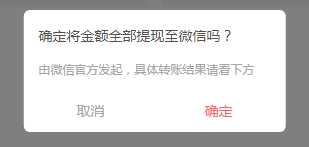
公共组件页面:
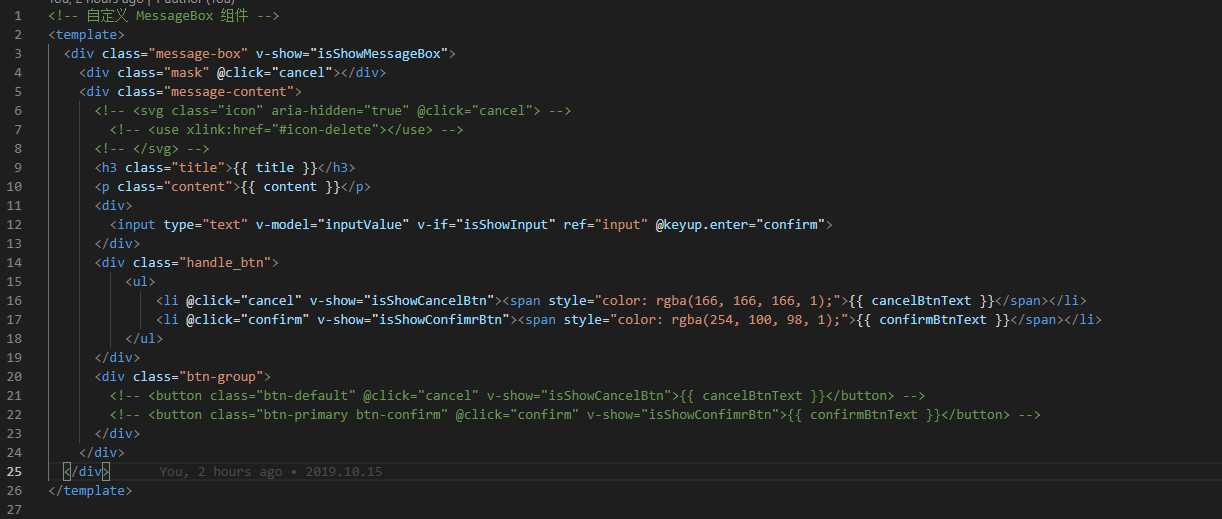
js部分:
<script>
export default {
props: {
title: {
type: String,
default: ‘标题‘
},
content: {
type: String,
default: ‘这是弹框内容‘
},
isShowInput: false,
inputValue: ‘‘,
isShowCancelBtn: {
type: Boolean,
default: true
},
isShowConfimrBtn: {
type: Boolean,
default: true
},
cancelBtnText: {
type: String,
default: ‘取消‘
},
confirmBtnText: {
type: String,
default: ‘确定‘
}
},
data () {
return {
isShowMessageBox: false,
resolve: ‘‘,
reject: ‘‘,
promise: ‘‘ // 保存promise对象
};
},
methods: {
// 确定,将promise断定为resolve状态
confirm: function () {
this.isShowMessageBox = false;
if (this.isShowInput) {
this.resolve(this.inputValue);
} else {
this.resolve(‘confirm‘);
}
this.remove();
},
// 取消,将promise断定为reject状态
cancel: function () {
this.isShowMessageBox = false;
this.reject(‘cancel‘);
this.remove();
},
// 弹出messageBox,并创建promise对象
showMsgBox: function () {
this.isShowMessageBox = true;
this.promise = new Promise((resolve, reject) => {
this.resolve = resolve;
this.reject = reject;
});
// 返回promise对象
return this.promise;
},
remove: function () {
setTimeout(() => {
this.destroy();
}, 300);
},
destroy: function () {
this.$destroy();
document.body.removeChild(this.$el);
}
}
};
</script>
css部分:
<style lang="less" scoped>
.message-box {
position: relative;
.mask {
position: fixed;
top: 0;
left: 0;
bottom: 0;
right: 0;
z-index: 50000;
background: rgba(0, 0, 0, 0.5);
}
.message-content {
position: fixed;
box-sizing: border-box;
padding: 1em;
min-width: 70%;
left: 50%;
top: 50%;
transform: translate(-50%, -50%);
border-radius: 0.4em;
background: #fff;
z-index: 50001;
.icon {
position: absolute;
top: 1em;
right: 1em;
width: 0.9em;
height: 0.9em;
color: #878d99;
cursor: pointer;
&:hover {
color: #2d8cf0;
}
}
.title {
// font-size: 1.2em;
// font-weight: 600;
margin-bottom: 1em;
color: rgba(80, 80, 80, 1);
font-size: 14px;
line-height: 150%;
font-weight: normal;
}
.content {
// font-size: 1em;
line-height: 2em;
// color: #555;
color: rgba(166, 166, 166, 1);
font-size: 12px;
line-height: 150%;
}
input {
width: 100%;
margin: 1em 0;
background-color: #fff;
border-radius: 0.4em;
border: 1px solid #d8dce5;
box-sizing: border-box;
color: #5a5e66;
display: inline-block;
font-size: 14px;
height: 3em;
line-height: 1;
outline: none;
padding: 0 1em;
&:focus {
border-color: #2d8cf0;
}
}
.btn-group {
margin-top: 1em;
float: right;
overflow: hidden;
.btn-default {
padding: 0.8em 1.5em;
font-size: 1em;
color: #555;
border: 1px solid #d8dce5;
border-radius: 0.2em;
cursor: pointer;
background-color: #fff;
outline: none;
&:hover {
color: #2d8cf0;
border-color: #c6e2ff;
background-color: #ecf5ff;
}
}
.btn-primary {
padding: 0.8em 1.5em;
font-size: 1em;
color: #fff;
border-radius: 0.2em;
cursor: pointer;
border: 1px solid #2d8cf0;
background-color: #2d8cf0;
outline: none;
&:hover {
opacity: .8;
}
}
.btn-confirm {
margin-left: 1em;
}
}
}
}
.handle_btn{
position: relative;
bottom: -20px;
>ul{
display: flex;
justify-content: space-between;
text-align: center;
>li{
width: 45%;
span{
border-radius: 6px;
font-size: 14px;
line-height: 150%;
}
}
// >li:first-child{
// }
}
}
</style>
main全局:

公共的js设置全局属性
import msgboxVue from ‘./index.vue‘;
// 定义插件对象
const MessageBox = {};
// vue的install方法,用于定义vue插件
MessageBox.install = function(Vue, options) {
const MessageBoxInstance = Vue.extend(msgboxVue);
let currentMsg;
const initInstance = () => {
// 实例化vue实例
currentMsg = new MessageBoxInstance();
let msgBoxEl = currentMsg.$mount().$el;
document.body.appendChild(msgBoxEl);
};
// 在Vue的原型上添加实例方法,以全局调用
Vue.prototype.$msgBox = {
showMsgBox(options) {
if (!currentMsg) {
initInstance();
}
if (typeof options === ‘string‘) {
currentMsg.content = options;
} else if (typeof options === ‘object‘) {
Object.assign(currentMsg, options);
}
return currentMsg.showMsgBox()
.then(val => {
currentMsg = null;
return Promise.resolve(val);
})
.catch(err => {
currentMsg = null;
return Promise.reject(err);
});
}
};
};
export default MessageBox;
<!-- 自定义 MessageBox 组件 -->
<template>
<div class="message-box" v-show="isShowMessageBox">
<div class="mask" @click="cancel"></div>
<div class="message-content">
<!-- <svg class="icon" aria-hidden="true" @click="cancel"> -->
<!-- <use xlink:href="#icon-delete"></use> -->
<!-- </svg> -->
<h3 class="title">{{ title }}</h3>
<p class="content">{{ content }}</p>
<div>
<input type="text" v-model="inputValue" v-if="isShowInput" ref="input" @keyup.enter="confirm">
</div>
<div class="handle_btn">
<ul>
<li @click="cancel" v-show="isShowCancelBtn"><span style="color: rgba(166, 166, 166, 1);">{{ cancelBtnText }}</span></li>
<li @click="confirm" v-show="isShowConfimrBtn"><span style="color: rgba(254, 100, 98, 1);">{{ confirmBtnText }}</span></li>
</ul>
</div>
<div class="btn-group">
<!-- <button class="btn-default" @click="cancel" v-show="isShowCancelBtn">{{ cancelBtnText }}</button> -->
<!-- <button class="btn-primary btn-confirm" @click="confirm" v-show="isShowConfimrBtn">{{ confirmBtnText }}</button> -->
</div>
</div>
</div>
</template>
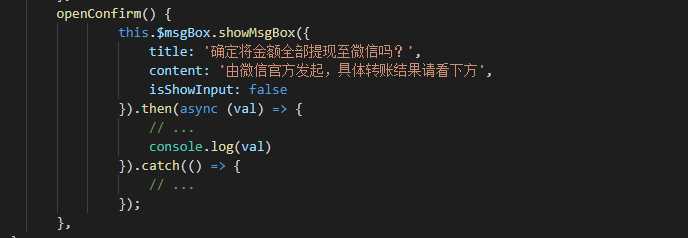
调用:
自定义 MessageBox 组件
标签:key dde css temp ping ola mode mon button
原文地址:https://www.cnblogs.com/zzz-knight/p/11679489.html